Web Pages
Web Development
Cascading Style Sheets (CSS)

Used to describe the appearance of Web content

What is CSS?

CSS (Cascading Style Sheets) is a language for styling HTML or XML documents, controlling layout, colors, fonts, and overall appearance to enhance user experience.

Why is CSS important?

CSS separates content from design, improves accessibility, enhances user experience, and provides responsive designs for different devices and screen sizes.


How do you add CSS to a web page?
What is the syntax of CSS?

CSS syntax: selector {property: value;}. Selectors target elements; properties define style attributes; values specify styling details.

What are CSS selectors?

CSS selectors target elements for styling. Common types: element, class, ID, and attribute selectors.

What are CSS properties?

CSS properties define styles like color, font-size, margin, and padding. Example: p { color: blue; }.

What software do I need to learn CSS?

You only need a simple text editor, like Notepad on Windows or TextEdit on Mac. For Output, you’ll need a web browser, like Chrome, Firefox, or Safari.


Text Editors
eg:
VS Code

At its heart, Visual Studio Code features a lightning fast source code editor, perfect for day-to-day use.

Sublime Text

Sublime Text is a shareware text and source code editor available for Windows, macOS, and Linux.

Web browsers

A web browser is an application for accessing websites. When a user requests a web page from a particular website, the browser retrieves its files from a web server and then displays the page on the user's screen. Browsers are used on a range of devices, including desktops, laptops, tablets, and smartphones.

eg:
Safari

Safari is a web browser developed by Apple. It is built into Apple's operating systems, including macOS, iOS, iPadOS and visionOS, and uses Apple's open-source browser engine WebKit, which was derived from KHTML. Apple Inc. Safari was introduced in Mac OS X Panther in January 2003.

Google Chrome

Google Chrome browser is a free web browser used for accessing the internet and running web-based applications. The Google Chrome browser is based on the Open Source Chromium web browser project.

Firefox

Mozilla Firefox, or simply Firefox, is a free and open source web browser developed by the Mozilla Foundation and its subsidiary, the Mozilla Corporation. It uses the Gecko rendering engine to display web pages, which implements current and anticipated web standards.

Brave

Simply put, the Brave Browser is 3x faster than Google Chrome. By blocking privacy-invading ads & trackers by default, there's less stuff to load on every single webpage you visit. That means pages load much faster, saving you time, money, and battery life. It also means you're much safer online.


Introduction (CSS)

CSS (Cascading Style Sheets) is a language designed to simplify the process of making web pages presentable. It allows you to apply styles to HTML documents, describing how a webpage should look by prescribing colors, fonts, spacing, and positioning. CSS provides developers and designers with powerful control over the presentation of HTML elements.

HTML uses tags and CSS uses rulesets. CSS styles are applied to the HTML element using selectors. CSS is easy to learn and understand, but it provides powerful control over the presentation of an HTML document.

Why CSS?

  • Saves Time: Write CSS once and reuse it across multiple HTML pages.
  • Easy Maintenance: Change the style globally with a single modification.
  • Search Engine Friendly: Clean coding technique that improves readability for search engines.
  • Superior Styles: Offers a wider array of attributes compared to HTML.
  • Offline Browsing: CSS can store web applications locally using offline cache, allowing offline viewing.

CSS Syntax

CSS consists of style rules that are interpreted by the browser and applied to the corresponding elements. A style rule set includes a selector and a declaration block.

  • Selector: Targets specific HTML elements to apply styles.
  • Declaration: Combination of a property and its corresponding value.
  • // HTML Element
    <h1>SL Coding School</h2>

    // CSS Style
    h1 { color: blue; font-size: 12px; }

    Where -
    Selector - h1
    Declaration - { color: blue; font-size: 12px; }
  • The selector points to the HTML element that you want to style.
  • The declaration block contains one or more declarations separated by semicolons.
  • Each declaration includes a CSS property name and a value, separated by a colon.

  • Example
    p {
                      color: blue;
                      text-align: center;
                  }
                  

    CSS declaration always ends with a semicolon, and declaration blocks are surrounded by curly braces. In this example, all paragraph element (<p> tag) will be centre-aligned, with a blue text color.

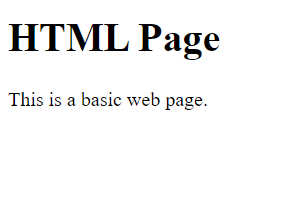
    Web Page with & without CSS

    Without CSS: In this example, we have not added any CSS style.

    HTML
    <!DOCTYPE html>
    <html>
      
    <head>
        <title>Simple Web Page</title>
    </head>
      
    <body>
        <main>
           <h1>HTML Page</h1>
           <p>This is a basic web page.</p>
        </main>
    </body>
      
    </html>
    
    Output
    Using CSS: In this example, we will add some CSS styles inside the HTML document to show how CSS makes a HTML page attractive and user-friendly.

    HTML
    <!DOCTYPE html>
      <html>
      
      <head>
          <title>Simple web page</title>
          <style>
              main {
                  width: 600px;
                  height: 200px;
                  padding: 10px;
                  background: beige;
              }
              
              h1 {
                  color: olivedrab;
                  border-bottom: 1px dotted darkgreen;
              }
              
              p {
                  font-family: sans-serif;
                  color: orange;
              }
          </style>
      </head>
      
      <body>
          <main>
              <h1>My first Page</h1>
              <p>This is a basic web page.</p>
          </main>
      </body>
      
      </html>
      
    Output
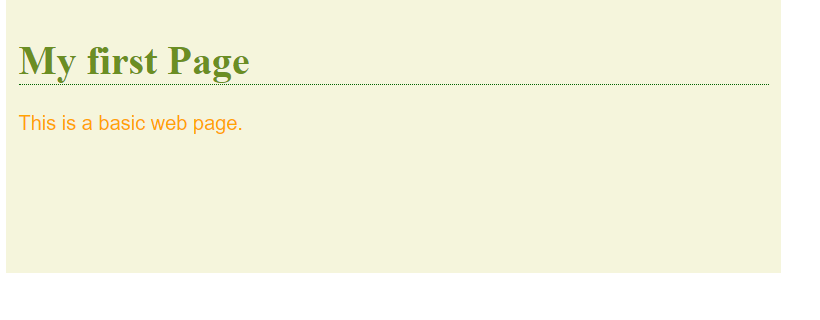
    CSS is essential for creating visually appealing and maintainable web pages. It enhances the website look and feel and user experience by allowing precise control over the presentation of HTML elements. Mastering CSS is crucial for effective web design and development.

    If you don't know what HTML is, we suggest that you read our HTML Tutorial.