HTML
Hypertext Markup Language (HTML) is the standard markup language for documents designed to be displayed in a web browser.
Introduction (HTML)
This webpage provides an introduction and basic knowledge of HTML.
HTML, or HyperText Markup Language, is the standard markup language used to create web pages. It’s a combination of Hypertext, which defines the link between web pages, and Markup language, which is used to define the text document within tags to structure web pages. This language is used to annotate text so that machines can understand and manipulate it accordingly. HTML is human-readable and uses tags to define what manipulation has to be done on the text. This guide will help you understand the workings of HTML and explain it with examples.
What is HTML
HTML stands for HyperText Markup Language and it is used to create webpages. It uses HTML tags and attributes to describe the structure and formatting of a web page.
HTML consists of various elements, that are responsible for telling search engines how to display page content. For example, headings, lists, images, links, and more.
Features of HTMLs
- It is easy to learn and easy to use.
- SIt is platform-independent.
- Images, videos, and audio can be added to a web page.
- Hypertext can be added to the text.
- It is a markup language.
HTML uses predefined tags and elements that instruct the browser on how to display the content. HTML elements include an opening tag, some content, and a closing tag. It’s important to remember to include closing tags. If omitted, the browser applies the effect of the opening tag until the end of the page. This section will dive into the basic structure of an HTML page, which includes essential building-block elements like doctype declaration, HTML, head, title, and body elements.

HTML Page Structure
The basic structure of an HTML page is shown below. It contains the essential building-block elements (i.e. doctype declaration, HTML, head, title, and body elements) upon which all web pages are created.
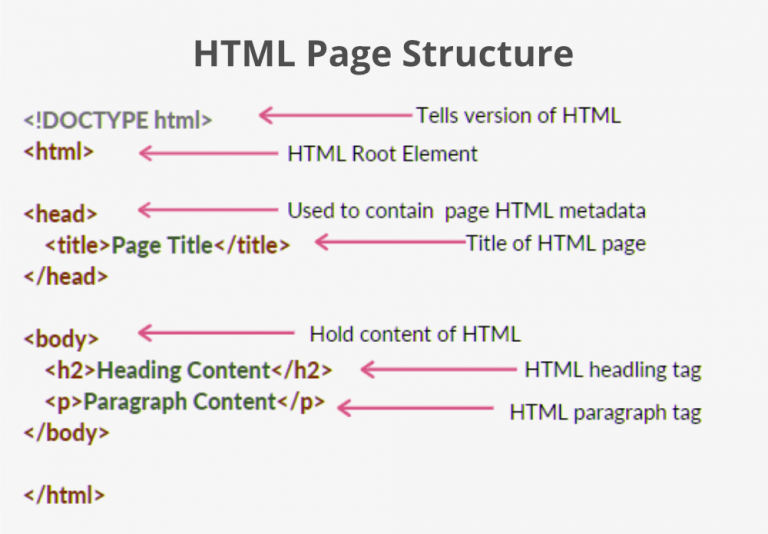
- <!DOCTYPE html> – This is the document type declaration (not technically a tag). It declares a document as being an HTML document. The doctype declaration is not case-sensitive.
- <html> – This is called the HTML root element. All other elements are contained within it.
- <head> – The head tag contains the “behind the scenes” elements for a webpage. Elements within the head aren’t visible on the front end of a webpage. HTML elements used inside the <head> element include:
- <style> – This HTML tag allows us to insert styling into our web pages and make them appealing to look at with the help of CSS.
- <title> – The title is what is displayed on the top of your browser when you visit a website and contains the title of the webpage that you are viewing.
- <base> – It specifies the base URL for all relative URL’s in a document.
- <noscript> – Defines a section of HTML that is inserted when the scripting has been turned off in the user’s browser.
- <script> – This tag is used to add functionality to the website with the help of JavaScript.
- <meta> – This tag encloses the metadata of the website that must be loaded every time the website is visited. For eg:- the metadata charset allows you to use the standard UTF-8 encoding on your website. This in turn allows the users to view your webpage in the language of their choice. It is a self-closing tag.
- <link> – The ‘link’ tag is used to tie together HTML, CSS, and JavaScript. It is self-closing.
- <body> – The body tag is used to enclose all the visible content of a webpage. In other words, the body content is what the browser will show on the front end.
Why learn HTML?
- It is a simple markup language. Its implementation is easy.
- It is used to create a website.
- Helps in developing fundamentals about web programming.
- Boost professional career.
Advantages of HTML
- HTML is used to build websites.
- It is supported by all browsers.
- It can be integrated with other languages like CSS, JavaScript, etc.
Disadvantages of HTML
- HTML can only create static web pages. For dynamic web pages, other languages have to be used.
- A large amount of code has to be written to create a simple web page.
- The security feature is not good.
HTML Element
| Start Tag | Element content | End tag |
|---|---|---|
| <h1> | My first heading | </h1> |
| <p> | My first paragraph. | </p> |
| <br> | none | none |
Note: Some HTML elements have no content (like the element). These elements are called empty elements. Empty elements do not have an end tag!